


Quick Verdict
cPanel introduces inherent background overhead through daemons like
cpsrvdandchkservd. However, when properly tuned via WHM and MultiPHP Manager, you can efficiently manage web stacks, MySQL databases, and email accounts without bottlenecking your infrastructure. The key is tuning the underlying services rather than relying on default panel states. Let’s move to cPanel Guide: Infrastructure & Performance Configuration.
The Reality of Control Panel Overhead
High load average. Unexplained CPU throttling. 502 Bad Gateway errors.
If you manage servers, you’ve likely seen a server collapse simply because a user tried to extract a massive .tar.gz archive via the web interface. Control panels make administration accessible, but they abstract away the underlying infrastructure. When you click a button in the UI, you are executing background scripts that directly impact CPU scheduling, disk I/O queue depth, and memory pressure.
This cPanel guide isn’t about where to click. It’s an explanation of what actually happens at the OS and hardware layer when you utilize standard cPanel features like the File Manager, MySQL databases, and addon domains.
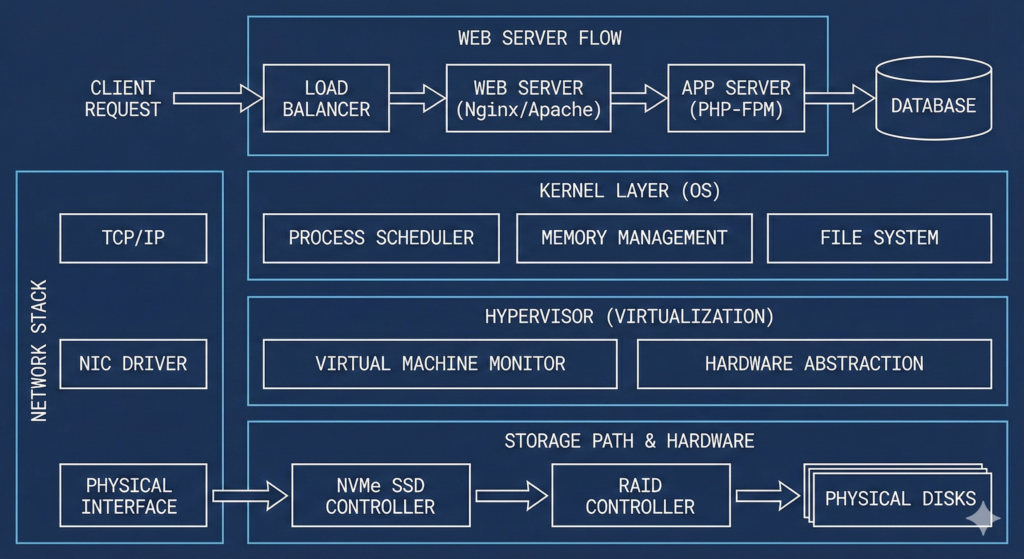
Deep Technical Core: What Happens Under the Hood? – cPanel Guide
cPanel isn’t a single application. It is a complex web of Perl scripts, APIs, and background daemons. Out of the box, an idle cPanel server consumes anywhere from 1GB to 2GB of RAM just to keep services like cpanellogd and tailwatchd running.
File Manager and Disk I/O Queue Depth
The cPanel File Manager is convenient, but it routes filesystem operations through the web server and PHP layer. When you upload or extract large archives using the File Manager, you are subject to PHP’s memory limits and execution timeouts.
More importantly, extracting heavily compressed files via the web UI can spike disk I/O and trigger high iowait states, especially on standard SATA SSDs. If the underlying disk cannot handle the sudden burst of IOPS, the kernel puts processes into an uninterruptible sleep state (D state). This is why your server load average suddenly jumps to 15.00 while unzipping a backup. For large operations, bypass the panel and use SSH (tar -xzf), allowing direct filesystem access without the web stack overhead.
MySQL Databases and Buffer Pool Exhaustion
Creating MySQL databases in cPanel takes seconds. But default configurations often leave the innodb_buffer_pool_size at a conservative 128MB.
When you attach heavy applications to these databases, the server quickly exhausts the buffer pool. Instead of reading from RAM, MySQL is forced to read from disk. Disk latency—even on NVMe drives—is orders of magnitude slower than memory access. This leads to MySQL lock wait timeouts and stalled queries. Managing databases effectively means monitoring memory pressure and tuning /etc/my.cnf based on actual dataset sizes, not just relying on the cPanel database wizard.
Addon Domains and PHP-FPM Pooling
Cramming 15 addon domains into a single cPanel account is a common practice, but it creates resource contention. By default, cPanel might route all those domains through a shared PHP process pool.
If one addon domain experiences a traffic spike or runs a poorly coded plugin, it exhausts the available PHP workers. This results in the Nginx or Apache reverse proxy returning a 502 Bad Gateway or 504 Gateway Timeout for all domains on that account.
Engineering best practice dictates using PHP-FPM with isolated pools. Using MultiPHP Manager, you can allocate dedicated worker processes. Understanding how to calculate pm.max_children based on your total RAM is critical to preventing out-of-memory (OOM) killer invocations.
Email Accounts and Mail Server Memory Pressure
Creating email accounts is trivial, but processing mail is resource-intensive. cPanel uses Exim for SMTP and Dovecot for IMAP/POP3. If you enable SpamAssassin, be prepared for memory consumption. SpamAssassin loads complex rulesets into RAM for every incoming message. During a dictionary attack or spam flood, Exim queues spike, and SpamAssassin can quickly consume all available memory, forcing the server to swap. Once a server starts swapping heavily, performance collapses.
Webmaster Tools and CPU Steal Time
cPanel includes webmaster tools like AWStats and Webalizer. These tools process Apache or Nginx access logs to generate statistics.
Parsing gigabytes of log files is CPU-bound. In a VPS environment, if you run log processing during peak traffic hours, you will hit your hypervisor’s CPU limits, resulting in high CPU steal time (%st in top). Your processes are literally waiting for the hypervisor to grant them CPU cycles. Offloading analytics to external tracking scripts is usually the better engineering choice.
Comparison: Default vs. Tuned Stack – cPanel Guide
| Feature | Low-Quality Host (Default cPanel) | FussionHost (Tuned Infrastructure) |
| PHP Handler | suPHP or CGI (High overhead) | PHP-FPM with isolated pools |
| MySQL Memory | 128MB Buffer Pool (Disk thrashing) | Tuned Buffer Pool based on RAM |
| Log Processing | Runs dynamically (Spikes CPU) | Scheduled off-peak or offloaded |
| Storage Latency | High iowait during File Manager tasks | NVMe with dedicated IOPS allocation |
What Most Hosts Won’t Tell You – cPanel Guide
- “Unlimited” Addon Domains are a myth. They are hard-capped by the filesystem’s inode limits and CloudLinux LVE constraints (if installed).
- The UI lies about performance. Your control panel might load quickly while your web application suffers from TCP retransmissions and packet loss.
- Default configs are built for compatibility, not speed. cPanel defaults prioritize ensuring old software runs, rather than optimizing for modern NVMe and CPU architectures.
Technical Implementation
To get actual performance out of a cPanel environment, you need to configure the underlying stack. Here are the baseline configurations we apply to production systems.
Nginx (Reverse Proxy via EA4):
Limit worker processes to the actual number of CPU cores and increase connection limits.
Nginx
worker_processes auto;
worker_connections 4096;
PHP-FPM (via MultiPHP Manager):
Avoid static pools unless you have highly predictable traffic. Use dynamic scaling but set a hard ceiling.
Ini, TOML
pm = dynamic
pm.max_children = 40
pm.start_servers = 10
pm.min_spare_servers = 5
pm.max_spare_servers = 20
MySQL / MariaDB (/etc/my.cnf):
Allocate sufficient memory to the InnoDB buffer pool (typically 50-70% of available RAM on a dedicated database server, less if sharing with a web stack).
Ini, TOML
innodb_buffer_pool_size = 2G
innodb_log_file_size = 512M
innodb_flush_method = O_DIRECT
Kernel sysctl Tuning (/etc/sysctl.conf):
Increase the connection backlog queue and aggressively reduce swapping behavior.
Bash
net.core.somaxconn = 65535
net.ipv4.tcp_max_syn_backlog = 16384
vm.swappiness = 10
Diagnostic Commands to Keep Handy:
When the panel feels sluggish, drop into the shell.
toporhtop(Watch for high%wafor disk IO, or%stfor steal time)iostat -dx 1(Check disk utilization and queue size)vmstat 1(Monitor context switches and memory swapping)ss -s(View TCP socket states and queue build-ups)
FAQ of cPanel Guide
How much RAM does a cPanel VPS actually need?
cPanel requires a minimum of 1GB just to install, but 2GB is the realistic floor for a completely idle server. For production environments running databases, PHP-FPM, and email, 4GB is the practical minimum to avoid swap usage.
Is NVMe always faster for the File Manager?
Yes, but only if the host hasn’t artificially throttled your IOPS. A heavily oversold node will still experience high disk latency even on NVMe storage due to noisy neighbors saturating the controller queue.
Why is my load average high when I haven’t added new sites?
Often, it’s background tasks. Log rotation, AWStats processing, or Exim struggling with a spam queue can drive up load averages even if your website traffic is flat.
Does more CPU cores mean a better cPanel experience?
Not necessarily. Web server processes often benefit more from higher single-core clock speeds than from a massive core count. If your host uses older processors with low base frequencies, compiling PHP or extracting files will still be slow.
Conclusion
cPanel is a powerful tool for managing web infrastructure, but it is not a substitute for proper systems engineering. The control panel adds a layer of abstraction that can easily mask underlying hardware bottlenecks or misconfigured service pools. Real performance requires looking past the UI and managing the kernel, the disk queues, and the process managers.
Stop stressing over server specs. Let FussionHost handle the heavy lifting. Check our cPanel Hosting Plans