

How to Register a Domain Name and Point it to Your Host: The No-Nonsense Engineering Guide
Quick Verdict: To get a site live, you need two things: a Domain Registration (the license to an entry in the global registry) and a DNS Record (the pointer that maps that name to your server’s IP). Most people fail because they confuse Domain Binding with Nameserver propagation. Register the TLD, set your
A RecordsorNS, and wait for the TTL to expire. Period.
Analysis by the FussionHost Engineering Team.
The Reality of Domain Management
You’re here because you’re tired of “wizard” setups that hide what’s actually happening under the hood. Maybe you’ve seen a “404 Not Found” or the dreaded “DNS_PROBE_FINISHED_NXDOMAIN” after thinking you’d finished the setup.
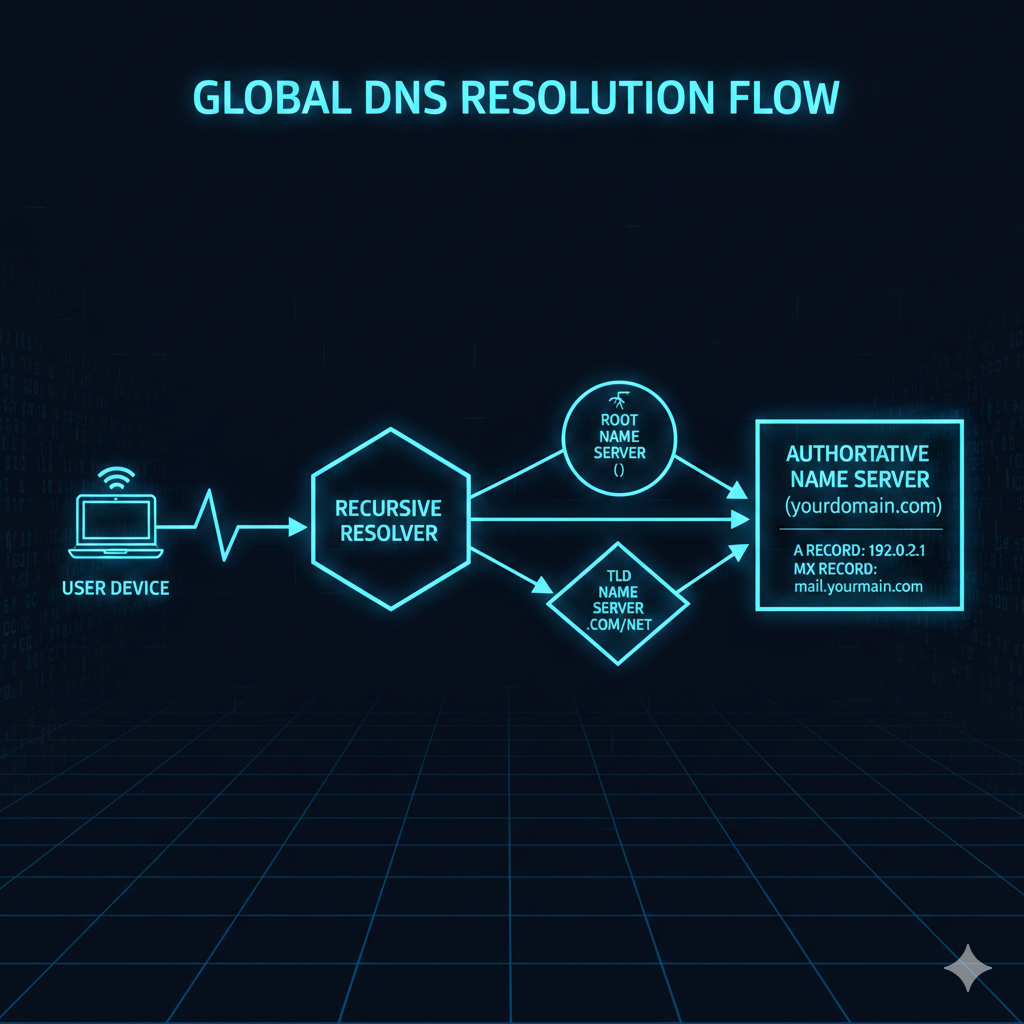
The industry treats domain registration like a retail shopping experience. It’s not. It’s a database entry in a distributed system. If you don’t understand how a Recursive Resolver talks to a Root Server, you’re just guessing. This guide skips the marketing “choose a catchy name” advice and gets straight into the plumbing of TLDs, zone files, and propagation lag.
What We’re Covering:
- The Architecture of Domain Registration (ICANN & Registries)
- The FussionHost Registration Workflow
- Nameservers vs. A Records: Choosing your routing method
- Configuring Zone Files for Speed and Reliability
- The “Hidden” Latency: TTL and Propagation
The Core Concept: How Domain Registration Actually Functions
When you register a domain name, you aren’t “buying” a piece of the internet. You are leasing a row in a registry database managed by an entity like ICANN. This row contains your contact information and, crucially, pointers to your Authoritative Nameservers.
The technical bridge between your domain name and your server is the Domain Name System (DNS). Think of it as the internet’s phonebook, but instead of names and numbers, it maps Human-Readable Strings (example.com) to Machine-Readable Addresses (IPv4 or IPv6).
Standard vs. High-Performance DNS Configuration
| Feature | Standard Setup (Basic) | High-Performance (FussionHost Standard) |
| Propagation Speed | 24–48 Hours (High TTL) | < 1 Hour (Optimized TTL) |
| Redundancy | Single Provider NS | Anycast DNS Cluster |
| Security | Basic Whois Privacy | DNSSEC + Registry Locking |
| Record Types | A, CNAME only | A, AAAA, MX, TXT, SRV, CAA |
What Most Hosts Won’t Tell You: The “Domain Lock” Trap
Here is the raw truth: many “budget” hosts make it incredibly easy to register a domain name but a nightmare to leave. They use proprietary Nameserver locks or obscure the EPP (Authorization) Code behind layers of support tickets.
At FussionHost, we believe in technical sovereignty. A registrar should be a gateway, not a jail. Another “secret” is the Neighbor Effect on shared DNS clusters. If your registrar uses a weak DNS infrastructure, a DDoS attack on one of their other clients can knock your domain resolution offline, even if your actual web server is perfectly fine. This is why we utilize an Anycast DNS network, ensuring your domain’s “address” is broadcast from multiple global nodes simultaneously.
Implementation: Registering and Pointing Your Domain
Step 1: Procurement and TLD Selection
When you register a domain name, the TLD (Top-Level Domain) matters for more than just branding. From a systems perspective, different TLDs have different registry requirements and propagation behaviors. .com and .net are managed by Verisign and are the gold standard for stability.
- Navigate to the FussionHost Domain Portal.
- Search for your string. Our system queries the registry in real-time via the EPP protocol.
- Complete the checkout. This initiates a “Create” command to the registry.
Step 2: Pointing the Domain (The Technical Meat)
Once you own the domain, it’s a “parked” asset. It does nothing until you configure the Zone File. You have two primary paths:
Method A: Using FussionHost Nameservers (Recommended)
This hands off the DNS management to us. You point your domain to our cluster, and we handle the records.
- NS1: https://www.google.com/search?q=astral.fussionhost.com
- NS2: https://www.google.com/search?q=stellar.fussionhost.com
Method B: Pointing to an External Host (A Record)
If your site is hosted on a specific VPS or dedicated server, you need to edit the A Record. This maps the domain directly to an IPv4 address.
Example Nginx/Server Configuration Context:
Once the domain points to your IP, your server’s virtual host must be ready to receive it. On a Linux/Nginx stack, your config should look like this:
Bash
server {
    listen 80;
    listen [::]:80;
    server_name yourdomain.com www.yourdomain.com;

    root /var/www/yourdomain/public;
    index index.html index.php;

    location / {
        try_files $uri $uri/ =404;
    }
}
Step 3: Managing TTL (Time To Live)
The most common mistake engineers make is ignored the TTL. TTL defines how many seconds a DNS record is cached by resolvers (like Google DNS or your ISP) before they check for an update.
- During Migration: Lower your TTL to 300 seconds (5 minutes) before you make changes.
- Stable Production: Set TTL to 3600 (1 hour) or 86400 (24 hours) to reduce DNS lookup overhead and improve performance.
FAQ: Frequently Asked Questions
How long does it actually take to register a domain name?
The registration itself is near-instant (seconds). However, the Global DNS Propagation—the time it takes for every ISP in the world to update their cache—can take anywhere from 15 minutes to 48 hours depending on your previous TTL settings.
What is the difference between an A Record and a CNAME?
An A Record maps a name to a physical IP address ($192.0.2.1$). A CNAME (Canonical Name) maps a name to another name (e.g., www points to example.com). You cannot use a CNAME for the “root” domain (the @ record) according to RFC 1034/1035 standards, though some hosts use “ALIAS” records to hack around this.
Why do I need Whois Privacy?
When you register a domain name, your home address, email, and phone number are added to a public database. Spammers scrape this 24/7. Whois Privacy replaces your data with proxy data, keeping your server admin’s identity (and your sanity) intact.
The Final Verdict
Registering a domain is the easy part; managing the DNS lifecycle is where the pros separate themselves from the amateurs. If you want a fast, resilient site, you need to understand that every millisecond spent on a DNS lookup is a millisecond your user is staring at a blank screen.
Stop settling for sluggish DNS and confusing interfaces. At FussionHost, we provide the raw power and granular control that systems engineers crave.
Stop stressing over server specs. Let FussionHost handle the heavy lifting. Check our Domain Plans.