NVMe VPS Hosting in
50+ Locations Worldwide

KVM VPS with NVMe storage, full root access and a dedicated IP. Deploy in under 60 seconds across Asia, Europe, the Americas, Africa and Oceania. From $9.99/mo.

50+

Locations

1 Gbps

Network Port

< 60s

Deployment

Choose Your VPS Location

All plans include KVM virtualization, NVMe storage and full root access.

USA VPS 1

$ 9.99 /mo
Server Specification:
1GB RAM & 1 Core CPU
25GB NVMe Storage
1TB Bandwidth
1 Dedicated IP
Linux/Windows OS
Deploy Instantly
Admin Access

Full Private Server

1 Gbps LAN Port

You'll get the Internet speed 1 to 1 Gbps

Germany VPS 1

$ 9.99 /mo
Server Specification:
1GB RAM & 1 Core CPU
25GB NVMe Storage
1TB Bandwidth
1 Dedicated IP
Linux/Windows OS
Deploy Instantly
Admin Access

Full Private Server

1 Gbps LAN Port

You'll get the Internet speed 1 to 1 Gbps

Singapore VPS 1

$ 9.99 /mo
Server Specification:
1GB RAM & 1 Core CPU
25GB NVMe Storage
1TB Bandwidth
1 Dedicated IP
Linux/Windows OS
Deploy Instantly
Admin Access

Full Private Server

1 Gbps LAN Port

You'll get the Internet speed 1 to 1 Gbps 

Pakistan VPS 2

$ 14.99 /mo
Server Specification:
2GB RAM & 1X CPU
50GB NVMe Storage
 
You can add more storage on the configuration page.
1TB Bandwidth

Each instance will be configured with 1TB Bandwidth.
You can add more Bandwidth on the configuration page

1 Dedicated IP
Linux OS
Deploy Instantly
Admin Access

Full Private Server

100 Mbps LAN Port

You'll get the Internet speed 1 to 100 Mbps

VPS Locations Deploy to Our Global Network

Host your services closer to your users. Our network spans 50+ locations across 6 continents, cutting latency and improving load times for visitors in every region.

Enterprise Hardware, Predictable Performance

KVM virtualization with dedicated resources no overselling, no noisy neighbours competing for your CPU.

NVMe SSD Storage

Every plan runs on enterprise NVMe drives, delivering far higher IOPS and lower latency than SATA SSDs. Database queries and file operations finish in a fraction of the time.

DDoS Protection

Volumetric attacks are filtered at the network edge before they reach your server, so your services stay online without you touching a thing.

Global Low Latency

Deploy in any of 50+ data centers and cut the round-trip time between your server and your users. Closer servers mean faster page loads.

50+ Locations Worldwide

Browse every city we deploy in. Click any location for regional pricing and latency details.

VPS vs Shared vs Dedicated Hosting

Three tiers, three very different levels of control. Here’s where a VPS sits between them.

Comparison of shared hosting, VPS hosting and dedicated servers at FussionHost
CompareShared HostingSimplest optionRECOMMENDEDVPS HostingBest balanceDedicated ServerMaximum power
ResourcesShared across accountsDedicated and guaranteedEntire physical machine
Root accessNoYesYes
Install any softwareNoYesYes
Choose your OSNoYesYes
Traffic spikesLimited headroomHandles spikes wellHighest capacity
Technical skillNone requiredModerateAdvanced
Best forFirst websites and blogsGrowing sites, apps and game serversHigh-load production systems
Starting price$0.99 /mo$9.99 /moCustom
View Shared PlansView VPS PlansTalk to Sales

Shared Hosting

Simplest option

Resources
Shared across accounts
Root access
No
Install any software
No
Choose your OS
No
Traffic spikes
Limited headroom
Technical skill
None required
Best for
First websites and blogs
Starting price
$0.99/mo
View Shared Plans

VPS Hosting

Best balance — recommended

Resources
Dedicated and guaranteed
Root access
Yes
Install any software
Yes
Choose your OS
Yes
Traffic spikes
Handles spikes well
Technical skill
Moderate
Best for
Growing sites, apps and game servers
Starting price
$9.99/mo
View VPS Plans

Dedicated Server

Maximum power

Resources
Entire physical machine
Root access
Yes
Install any software
Yes
Choose your OS
Yes
Traffic spikes
Highest capacity
Technical skill
Advanced
Best for
High-load production systems
Starting price
Custom
Talk to Sales

Outgrowing shared hosting but not ready for a dedicated server? A VPS is the middle ground — dedicated CPU, RAM and storage with full root access, without the dedicated price tag.

What Can You Host on a VPS?

Full root access means you’re not limited to what a control panel allows. Here’s what our customers actually run.

Websites & Web Apps

Host WordPress, Laravel, Django or a custom stack with the exact PHP
version, extensions and server config your project needs no shared hosting limits on memory or execution time.

APIs & Backends

Run Node.js, Python or Go services behind a dedicated IP. Set your own process manager, reverse proxy and cron schedule.

Game Servers

Minecraft, CS2, Rust, Valheim and more. Pick a location near your players to keep ping low, and add RAM as your community grows.

Forex Trading

Keep MT4 and MT5 running around the clock without leaving your own PC switched on. Windows VPS with stable uptime and low latency to broker servers.

VPN & Private Tools

Set up WireGuard or OpenVPN on hardware you control. Also useful for self-hosted password managers, file storage and internal dashboards.

Development & Staging

Mirror your production environment for testing. Snapshot before a risky
deploy and roll back in seconds if something breaks.

Deploy Your VPS in 4 Steps

No command line needed to get started. Your server is live before you finish your coffee.
  1. STEP 01

    Pick a location near your users

    Every 1,000 km between your server and your visitor adds roughly 10ms of round‑trip latency. For a Pakistani audience, Karachi beats Frankfurt by around 120ms, which is enough to notice on every page load.

    Match the region where most of your traffic originates, not where you happen to live. Check your analytics before deciding.

  2. STEP 02

    Size your plan honestly

    • 1 GB RAM runs a small WordPress site, a VPN, or a Discord bot.
    • 2 GB is the realistic floor once you add a database and caching.
    • 4 GB handles a busy WooCommerce store or several small apps.
    • 8 GB and up is for game servers and applications with real concurrency.

    Then choose your OS. Ubuntu LTS if you are unsure, Windows Server only if your software requires it. Both can be reinstalled later, but you lose the disk, so decide before you build.

  3. STEP 03

    Deploy and secure it in the first ten minutes

    Your server is provisioned automatically after checkout, with root credentials and a dedicated IPv4 emailed within 60 seconds. Before installing anything, do these three things. Bots find fresh IPv4 addresses within minutes of allocation.

    1. Add an SSH key and disable password login
    2. Create a non‑root sudo user
    3. Enable the firewall, allowing only ports 22, 80 and 443

    That is fifteen minutes of work that prevents the single most common way new servers get compromised.

  4. STEP 04

    Install your stack

    Connect over SSH on Linux or RDP on Windows, then build what you need. Prefer a dashboard? CyberPanel and aaPanel are free and install in one command. Prefer the terminal? Docker, LEMP and Node.js are a package manager away.

    Snapshot before any risky change. Rolling back takes seconds. Rebuilding takes an evening.

Not sure which location or plan size fits your project? Tell our engineers what you are building and they will recommend one.

Talk to Our Team

Linux or Windows VPS
Which Should You Choose?

Every plan runs on KVM, so both are available. The right answer depends on what you are running, not on which one is better.

Linux VPS

Choose Linux if you are hosting websites, APIs, databases or anything built for the web. Ubuntu, Debian, AlmaLinux and Rocky are all one click away, and every server tutorial online assumes you are on one of them.

It also uses less RAM. A Linux VPS with 1 GB has roughly 900 MB free for your application. The same server running Windows has closer to 400 MB, because the desktop and services take the rest.

Best for: WordPress, Node.js, Docker, VPN servers, game servers, staging environments

Windows VPS

Choose Windows only when your software will not run anywhere else. MT4 and MT5 for forex, .NET applications, MS SQL Server, and Android emulators all fall into that category.

You get full Administrator access over RDP with a desktop you can see, which some people find easier than a terminal. Plan for 2 GB RAM as the practical minimum, and 4 GB if you are running trading terminals or emulators.

Best for: Forex trading, .NET apps, MS SQL, Android emulators, remote desktop work

Managed or Unmanaged
Who Handles the Server?

This is the question that decides whether a VPS works out for you. It has nothing to do with hardware and everything to do with who fixes it at 3am.

Unmanaged VPS

You get root access and a clean OS. Everything after that is yours: updates, firewall rules, web server config, backups, and diagnosing things when they break.

Choose this if you are comfortable in a terminal, or willing to learn. It is how most developers run their servers, and it costs less because you are not paying for someone else’s time.

You handle: OS updates, security patches, software installs, troubleshooting

We handle: hardware, network, power, the hypervisor

~ ssh root@vps-fra-001 root

This is real root access. Install any package, edit any config file, and run any service. Nothing is locked behind a control panel.

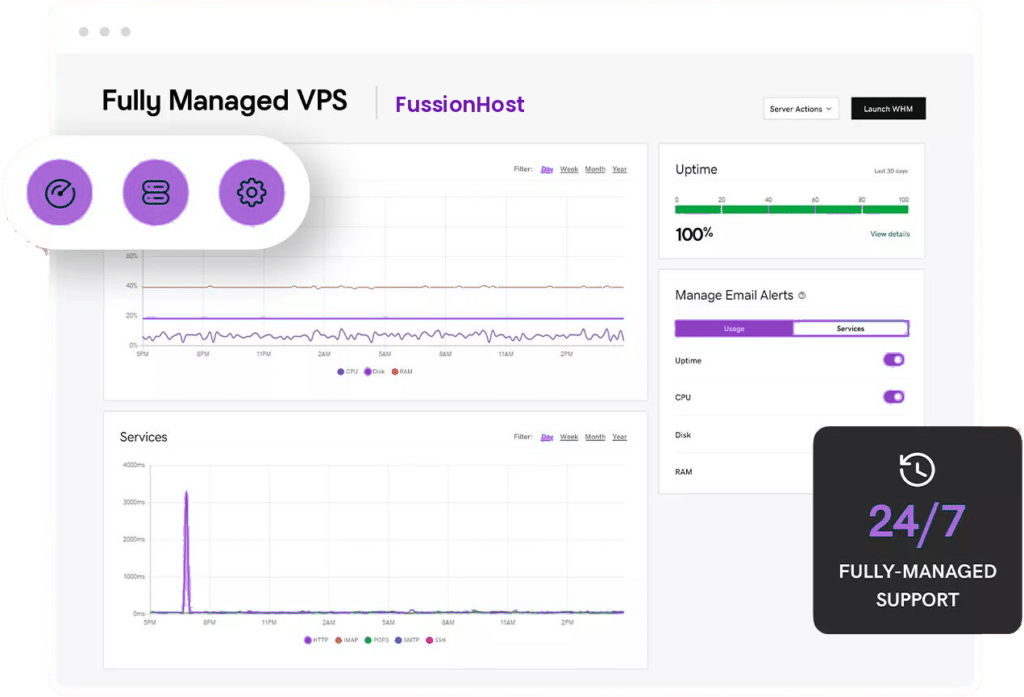
Managed VPS dashboard showing 100% uptime, CPU monitoring and service alerts

Managed VPS

Our team handles the operating system layer too. Security patching, control panel setup, service monitoring, and support when something stops responding.

Choose this if your time is better spent on your business than on sudo apt upgrade. It costs more per month and usually saves money overall once you count the hours.

You handle: your website and application

We handle: everything underneath it

Deploy Any OS or Application in One Click

Pick your operating system at checkout, or start from a pre-configured stack. Reinstall or switch to a different OS any time from the control panel without opening a ticket.

Deployed in one click with full root access over SSH. Switch or reinstall your distribution any time from the control panel, no ticket required.

  • Ubuntu20.04 / 22.04 / 24.04 LTS
  • Debian11 / 12
  • CentOS Stream9
  • AlmaLinux8 / 9
  • Rocky Linux8 / 9
  • FedoraLatest release
  • openSUSELeap 15
  • Arch LinuxRolling release
  • Alpine LinuxLightweight, minimal
  • FreeBSD13 / 14

Full Administrator access over RDP with a desktop you can see. Plan for 2 GB RAM as the practical minimum, and 4 GB if you are running trading terminals or emulators.

  • Windows Server 2016Standard edition
  • Windows Server 2019Standard edition
  • Windows Server 2022Standard edition
  • Windows 10Pro
  • Windows 11Pro

Prefer a dashboard over the command line? These panels install at deployment, so your server is manageable from the first minute.

  • cPanel / WHMLicence sold separately
  • PleskLinux or Windows
  • CyberPanelFree, LiteSpeed based
  • aaPanelFree, lightweight
  • CloudPanelFree, NGINX based
  • WebminFree, module based

Skip the setup. These stacks arrive configured and running, so you can start building instead of installing dependencies.

  • WordPressWith LiteSpeed cache
  • DockerEngine and Compose
  • LAMP StackApache, MySQL, PHP
  • LEMP StackNGINX, MySQL, PHP
  • Node.jsLTS build
  • PythonWith pip and venv
  • MySQLStandalone database
  • PostgreSQLStandalone database
  • NextcloudPrivate file storage
  • GitLabSelf-hosted Git
  • OdooOpen-source ERP
  • Jitsi MeetSelf-hosted video calls
  • n8nWorkflow automation
  • WireGuardVPN server
  • OpenVPNVPN server
  • GrafanaMetrics dashboards

Windows instances tuned for Android emulation, with the CPU headroom and nested virtualization these workloads need.

  • LDPlayerMulti-instance ready
  • BlueStacksAndroid app testing
  • NoxPlayerLightweight emulator
  • MEmu PlayMulti-instance support
  • MuMu PlayerHigh FPS profile

See emulator VPS plans

Host your own multiplayer world. Deploy in the region closest to your players to keep ping low, and add RAM as your community grows.

  • MinecraftJava and Bedrock
  • Counter-Strike 2Dedicated server
  • RustDedicated server
  • ValheimDedicated server
  • PalworldDedicated server
  • PterodactylGame server panel

STILL DECIDING?

VPS Hosting Questions, Answered

Still have a question?

Our hosting engineers are online 24/7/365. Ask us anything before you buy no sales pressure, just a straight answer.

Talk to us

Typical reply in under 5 minutes

A VPS (Virtual Private Server) gives you dedicated resources (RAM/CPU/storage) on a virtual machine, so your performance isn’t affected by other users like shared hosting. You also get more control, better stability, and stronger isolation.

FussionHost VPS plans run on KVM virtualization, which provides strong isolation, reliable performance, and full control like a real server.

Yes — FussionHost VPS plans use NVMe storage for faster read/write speeds, quicker boot times, and better overall performance than standard SSDs.

Yes. You can deploy in multiple global locations. Choose the location closest to your customers to reduce latency and improve page/app speed.

Pick the region closest to your audience:

  • Visitors in Europe → choose an EU location (e.g., Frankfurt, London, Amsterdam)

  • Asia traffic → Singapore / Seoul / Japan / etc.

  • Americas traffic → USA / Canada / Mexico / South America locations
    If you’re unsure, tell us your target country and we’ll suggest the best location.

Both are available depending on the plan. You can run common Linux distributions and also Windows VPS (if enabled for your selected plan/configuration).

Yes. VPS includes full administrative access:

  • Linux: root access

  • Windows: Administrator access

Yes — plans include dedicated IP (and depending on configuration, you may be able to add more IPs).

Most VPS instances are deployed instantly after checkout and configuration.

Yes. You can scale resources (RAM/CPU/storage) as your project grows. Upgrades are designed to be smooth so you don’t have to migrate to a new provider.

For a small WordPress site or a VPN, 1–2 GB is enough. Busy sites with databases usually want 4 GB. Game servers and applications with heavy traffic start at 8 GB. You can upgrade at any time, so start small and scale when you actually need to.

We provide 24/7 support through chat/tickets. We can help with deployment guidance, basic troubleshooting, and best-practice recommendations.

Need Help? We're Here 24/7/365

Our support team never sleeps. Whether you need help migrating a site, configuring your VPS, or just have a quick pre-sales question  reach out the way that suits you best. Real people, no bots, no waiting.

Chat on WhatsApp

Get instant answers from our team without leaving your phone. Perfect for quick questions and urgent issues.

Submit a Support Ticket

For technical issues that need a detailed review, our senior engineers respond with a full solution tailored to your setup.

Talk to a Human

Live chat with a real hosting expert any time of day. No scripted replies, no queue tickets  just direct help.

Copyright © 2026 FussionHost LTD

Skip to content